Sunday, August 21, 2016
Epson Turns Summer Memories Into Priceless Keepsakes.
Posted by Amber Fallon at 5:32 PM 27 comments
Labels: Epson, photo printer, photography, picture, pictures, printer, Printers, technology
Wednesday, October 28, 2015
Vivitar DVR 786 Action Camera Review & Giveaway
On October 15th, the Vivitar made its debut. The Vivitar DVR786, a versatile, rugged and affordable action camera. This camera is the perfect gift for teens on the go, adventurers looking for exciting POV video footage, and families who want to capture every moment of that holiday vacation.
Our Thoughts
The Vivitar 786 came in the waterproof casing and with all the assembly parts in the box as well. The waterproof container is easy to open and take the camera in and out. I plugged it in and turned it on as soon as I got it and the viewfinder already gave a great image. While it's incredibly small (it's supposed to be) the pictures are taken as normal sized. It is not any different than a regular camera, except it does take amazing photos.
I don't live near the ocean so I'm not exactly scuba diving and taking pictures, but I did want to test this underwater and so I put it in the bathtub and it works great!! I've never taken underwater pictures before so it was pretty fun.
I mentioned before how small it is, and it is small, it's perfect to fit in the side pocket of my diaper bag so I'm always to take it on the go with my kids and since it's water-proof I was able to take it to a water park and get some great photos without worrying I'd ruin the camera.
My husband rides ATVs and he tested out the mount for that and he said it worked great, was nice and sturdy and by seeing the pictures myself, does great! This really is a versatile camera for parents who's kids move all over the place, any adventurer taking pictures on the go or underwater pictures.
On top of all the great pictures you get to take, this is a DVR (digital video recorder) so you can take amazing videos of your favorite action or family fun!
Great price for such a versatile piece of technology
The Giveaway!
One lucky winner is going to receive a Vivitar DVR786. To enter, just fill in the Giveaway Tools form below. This giveaway will end on 11/19/15. Open to the US only. The winner will be notified via email and will have 48 hours to reply. Thanks again to the sponsor for offering this fantastic prize!
Buy yours on amazon and don't forget to check them out on Facebook and Twitter!
Reviewed by Jackie
Posted by J at 5:49 PM 57 comments
Labels: Action, adventures, camera, giveaway, giveaways, photography, pictures, vivitar
Tuesday, October 27, 2015
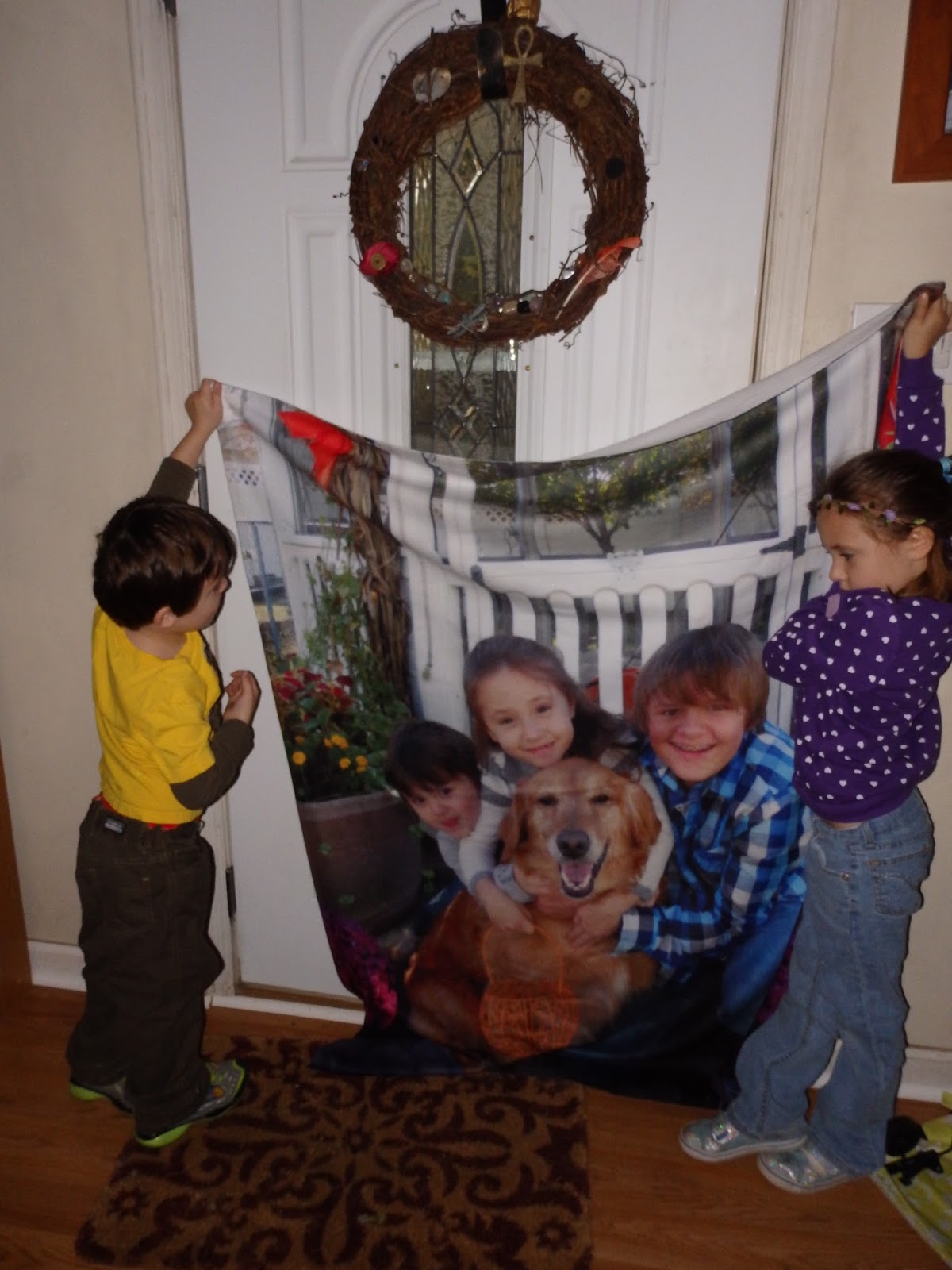
Holiday Gift Guide - Photo Blanket from Collage.com
As a mom of four, one of the things that makes me the happiest is getting a good picture of my children. I have spent thousands of dollars getting professional pictures done over the years, but often times I find my own home pictures are actually better and more natural. But printing those pictures is a hassle and I can't print jumbo copies that I can hang on my walls. That's where Collage.com comes in. They take your home photos and turn them into high quality prints that are nicer than anything you'll get at a picture studio. Have your favorite family photo printed on canvas, aluminum, or even a blanket. The possibilities are limitless.
For my review, I was sent a gift code for a photo blanket so that I could experience the full Collage.com service. They make it incredibly easy to create your masterpiece. All I had to do was upload my favorite photo. I barely had to make any adjustments at all. It was super easy and only took a few minutes. Once the picture was loaded, I was able to choose between a full color print, black and white, and sepia. I went with color print, but you can preview how each option will look to help you decide. You can also crop the photo down to size or adjust it so it fits. In addition to the blankets, you can also create your own canvas, bamboo prints, calenders, ornaments, and so much more.
Once I was done with the ordering process, I proceeded to a secure check out where I was happy to see shipping was a reasonable price. I received the finished product about a week later. I was very happy with the whole shopping experience and I am very excited about getting this beautiful blanket. It's soft and cuddly, and the colors are very vivid. We'll be sending this one off to my mother so she can snuggle with her grandchildren even when they aren't close by.
Of course, this is only one of the fun gift idea you can find at Collage.com. To see all they have to offer, be sure to visit their website or follow them on social media.
Connect with Collage.com
Face Book Twitter Pinterest Instagram
Posted by GabbyLowe at 4:34 PM 0 comments
Labels: Blanket, canvas, Holiday Gift Guide, photo book, photography, Reviews
Friday, January 23, 2015
Get a Great Shot Anywhere with the XSories Deluxe Bendy Tripod
In addition to all these awesome features, the tripod is also extremely light weight and portable. It will fit inside your camera bag without any problem. You could even stick in it your pocket if you wanted to. It's sturdy and well made, comes in a wide range of fun colors, and I know it's going to get a lot of use around here! Of course, this is only one of the cool accessories available from XSories. To see their full line of products, be sure to check out their website or follow them on their social media.
Connect with XSories
Friday, December 5, 2014
Holiday Gift Guide: Beginner's Guide to SLR Photography DVD #Giveaway
If you’re feeling overwhelmed about taking your camera off auto and learning how to change all the different settings your camera has to offer, you’ll love this step-by-step guide to learning how to use your camera to its full potential, with interactive assignments to get you out there to get some hands on practice after every topic.
- The three settings for getting light into Your camera: Shutter Speed, Aperture, and ISO and how to adjust them to get the shot you want.
- Camera Modes: When you might use the different modes on your camera (ie. Aperture Priority, Shutter Priority).
- White Balance: Learn the types of white balance, when to use them, and how to create a custom white balance.
- Raw vs. Jpg: What each one is and the positives and negatives of each.
- Lenses: Learn about the different types of lenses and how to decide which kind of lens you’ll need
- Flash: Learn how to use a mounted external flash to control and diffuse light.
- Taking Photos Outdoors & Indoors: Tips and tricks to get the best photos both outside and inside.
- Common Photography Equipment: Learn about memory cards, batteries, lens filters and more.
The DVD is about 45 minutes long and is stated in a way that even Grandma, who just got her first SLR and retired her 35mm, can go through and understand. Along the way through the DVD there are spots made for time-outs so you can pause it and go practice what was just taught. The host of the DVD also has you consult your owner's manual for your specific camera. This makes it more personal for you and your camera. It also makes it so you know your camera a lot better after you're done.
This is a DVD that I will probably consult from time to time even as a professional photographer. If you'd like to check out this DVD and purchase it, you can do so from the Photographer Overnight website. Photographer Overnight also offers a number of other learning DVDs on photography (you can see the photo at the bottom of the review). You can also follow Photographer Overnight on Facebook, Twitter, Pinterest, and YouTube.
One lucky winner is going to receive a Beginner's Guide to SLR Photography DVD! To enter just fill out the Rafflecopter form below. Open to the US only. Giveaway will end 12/26/14. The winner will be notified via email and will have 48 hours to reply. Thanks again to Photographer Overnight for offering this fantastic prize.
Posted by Tiff at 6:54 PM 11 comments
Labels: beginner photography, dslr camera, giveaways, Holiday Gift Guide, photography, Reviews
Friday, December 27, 2013
PicLight App for Mac
PicLight is a handy and powerful photo enhancement app for creating artistic lighting effects on photos.
PicLight provides four categories of lighting of Montage, Light, Glow and Texture altogether 170+ effect resources for creating gorgeous lighting on your photos. Together with other 25+ image filters and 18+ editing tools, PicLight is the perfect app for both hobbyists and photographers to bring out the best of their photos.
-----------------------------------------------
HIGHLIGHTED FEATURES
-----------------------------------------------
* 170+ Lighting Effects
170+ lighting effects including 40 Montage, 55 Light and 45 Glow for adding artistic lighting on your photos. 30 Texture effects will make your photos more unique with personalized touches. You can customize the lighting effect by four blending modes of Screen, Overlay, Color Dodge and Lighter; flipping the effect horizontally and vertically and setting its Alpha.
PicLight also makes it easy to superimpose four categories of effects on a photo.
* Cropping and 10+ Fine-Tuning Tools
Customize your perfect photo by rotating it, horizontally and vertically flipping it.
We offer powerful cropping tool with 7 preset ratios and you can customize your desired image sizes.
Fine-tune the photo’s Saturation, Hue, Exposure, Contrast, Brightness, Highlights and Shadows with ease.
* 25+ Image Filters
25+ image filters are available for straightforward photo enhancement such as Black & White, Sepia, Vintage, etc.
* Convenient Export & Share Options
PicLight allows you to save photo as image, send to iPhoto directly, set as wallpaper, send via E-Mail, share to Flickr and Facebook, etc.
Wednesday, November 6, 2013
Review: Eye-Fi Mobi Card
*** Product was received for free in exchange for an honest review. ***
Photos evoke such strong memories: your child walking for the first time, that road trip after college, the day you said “I do.” Those amazing memories simply demand higher quality than a smartphone camera can offer. With Mobi 32GB, there’s no need to compromise – greater storage capacity means every photo and video you want to capture is also available to share and enjoy from your mobile device.
How often do you discover images on your memory card leftover from last month? Last year? Mobi creates its own WiFi so images are uploaded to your smartphone or tablet as you take them. Photos and videos are ready when you are – for photo books, cards, prints or for anything you can imagine. For social sharers, editing and sharing memories with familiar apps like Facebook and Instagram, and text and email, are super simple because photos & videos are uploaded directly into the camera roll on the device.
And just in time for the holidays, Eye-Fi is offering a free 8x10 inch framed canvas print with a qualified purchase of a Mobi 32GB directly from the Eye-Fi website. This limited-time promotion allows Mobi users to take & share beautiful photos anytime, and continue to enjoy a favorite memory with a gorgeous print at home.
“Today’s photographer wants the ability to take great photos, but without compromising the convenience of mobile access and apps,” said Matt DiMaria, CEO of Eye-Fi. “The success of Mobi has clearly delivered on that promise and we’re thrilled to add capacity to an already well-loved product.”
Here’s how Eye-Fi Mobi 32GB works:
- Set up simply and instantly: Mobi has the simplest Eye-Fi card setup yet – no computer, no account and no cloud. Just download the free Eye-Fi app for iOS or Android, enter the Mobi card’s unique 10-digit code, and the mobile device is paired. Use the same code to pair as many mobile devices as needed.
- Share in real-time: Full-resolution photos and videos instantly transfer from camera to a device’s photo roll/gallery. From there, edit and share using the mobile apps you already love.
- Shoots in RAW/JPEG: Capture both RAW and JPEG. RAW stays on the card but JPEG transfers over the card’s WiFi.
- Transfer anywhere: Built-in WiFi means no WiFi network, hotspot or internet connection is needed for pairing or transfer; Mobi literally captures photos and then uploads a copy them from camera to a mobile device whenever new content is detected.
- Works with the devices users already own (and love): As with other Eye-Fi cards, Mobi works with thousands of cameras, including hundreds of Eye-Fi connected cameras that have integrated Eye-Fi technology for improved usability. The Eye-Fi app can be downloaded for iOS and Android smartphones and tablets, including the Kindle Fire.
- Back up automatically: Photos and videos transfer as they’re taken, so if anything happens to the camera, content is already safe on the mobile device.
- Exceptional quality and speed: Mobi reinforces Eye-Fi’s commitment to provide state-of-the-art performance in SD memory. HD video, low light and fast action shots are easily captured with this Class 10, high-capacity card.
Posted by Anne at 7:33 PM 0 comments
Labels: camera, Entertainment, eye-fi, eye-fi Mobi, photography, social media, wireless technology